Build the first impression.
Bring your capsules, screenshots and copy together. Edit your description right where it will be seen.
 StorefrontLab.
Explore Studio
StorefrontLab.
Explore Studio
A LITTLE WORKBENCH FOR YOUR BIG LAUNCH
Your capsule is small. Its job is huge. Check your artwork, see it in context, and get your Steam store page ready to share.
01 / THE FREE TOOL
Drop in a capsule. We check its dimensions and show how it reads when there is less room to make an impression.
Drop an image here, or choose a file.
PNG, JPG or WebP · Up to 15 MB / 40 megapixels920 × 430 px
Exact dimensions for the Steam header capsule.
Your images never leave this browser.
Choose an image to see the preview.
Still readable?
Check your title at a glance.
Select a file to check its dimensions.
Dimensions and a visual preview only. This tool cannot assess artwork rules, legibility or Steam approval. View the size guide ↗
02 / THE WHOLE PICTURE
Studio is a downloadable HTML app for assembling a complete store page and sharing a direction with your team.
Bring your capsules, screenshots and copy together. Edit your description right where it will be seen.
Switch between store, discovery, library and asset-sheet views. Try another direction in a separate project.
Export a self-contained HTML preview with your images inside. Your team can open it locally and explore it.
No installer. No cloud upload. No monthly subscription.
Desktop Chrome or Edge recommended.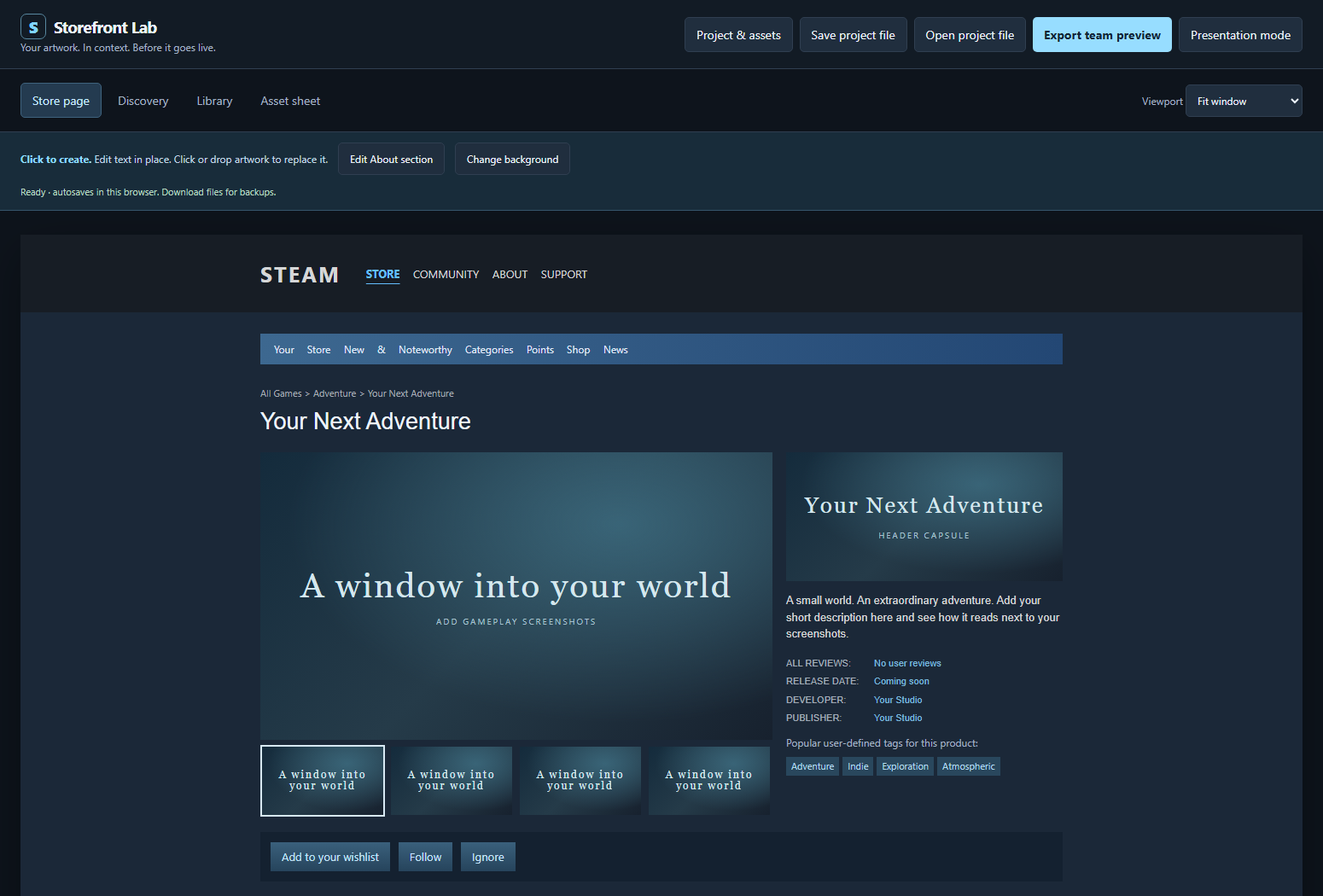
The downloadable editor, shown with its starter placeholders. The illustrated preview at the top of this site is a concept illustration.
03 / PICK YOUR WORKBENCH
Start with the free checker. Get Studio when you want to bring the whole store page together.
More room for the game itself.
An offline workspace you download and keep.
Paid downloads are not open yet. The free checker is ready to use.
Visual approximation, not a Steamworks submission tool. No wishlist or sales guarantees. No subscription, custom services or promised future updates.
A FEW GOOD QUESTIONS
No. Storefront Lab is an independent tool. Steam and Steamworks belong to Valve. Studio approximates common layouts; always check your final assets in Steamworks.
No. It reads the image on your device and keeps it in memory for the preview. It does not upload it or save it to browser storage. Reload the page or choose Remove to clear it.
A downloadable HTML editor and a getting-started guide. Open the editor in desktop Chrome or Edge, add your assets and copy, and save project backups or export an HTML team preview. There is no installer or account.
No. It helps you review composition, copy and asset dimensions. It does not create artwork, resize originals, upload to Steamworks, generate trailers or guarantee compliance.
The Studio workspace supports multiple local projects. You can create new projects and duplicate a direction without replacing the original. Keep exported project files as backups.
Built something worth playing?